


Sales (800) 971-1650 | Support (877) 334-6640
sales@qsronline.com | support@qsronline.com
QSROnline – Restaurant Management SoftwareQSROnline – Restaurant Management SoftwareQSROnline – Restaurant Management SoftwareQSROnline – Restaurant Management Software
  • About Us
    • Customers
    • Our Story
    • Meet The Team
    • Careers
  • Solutions
    • Labor Scheduling & Management
    • Inventory & Food Cost Management
    • Enterprise Reporting
    • Accounting & Payroll Automation
    • Mobile App Suite
      • Labor Scheduling App
      • Counting App
      • Reporting App
  • Resources
    • Blog
    • Case Studies
    • Overview Videos & Testimonials
  • Affiliate Program
  • Integration Partners
  • Pricing
  • Contact Us
  • REQUEST A DEMO

Restaurant Staff Scheduling Best Practices: How to Build Better Employee Schedules

    Home Blog Restaurant Staff Scheduling Best Practices: How to Build Better Employee Schedules
    Previous

    Restaurant Staff Scheduling Best Practices: How to Build Better Employee Schedules

    By Taren Martin | Blog | Comments are Closed | 3 September, 2026 | 0

    Building a good restaurant schedule isn’t just about filling every shift. It’s about having the right number of employees, and the right employees, working when the restaurant needs them most.

    One of the most important best practices for restaurant staff scheduling is to start with expected business rather than employee availability. Forecast demand first, determine how much labor you’ll need, and then match available employees to those shifts.

    Here’s how restaurant managers can put that process into practice.

    Start Your Restaurant Schedule With Forecasted Demand

    Before adding employees to the schedule, determine how busy you expect the restaurant to be.

    Historical sales and POS data can help managers identify busy and slow periods, day-of-week patterns, seasonal changes, and other trends that affect staffing needs.

    For example, a Friday dinner rush may require significantly more coverage than a Tuesday afternoon. Starting with expected demand helps managers build the schedule around what is likely to happen rather than simply repeating last week’s staffing.
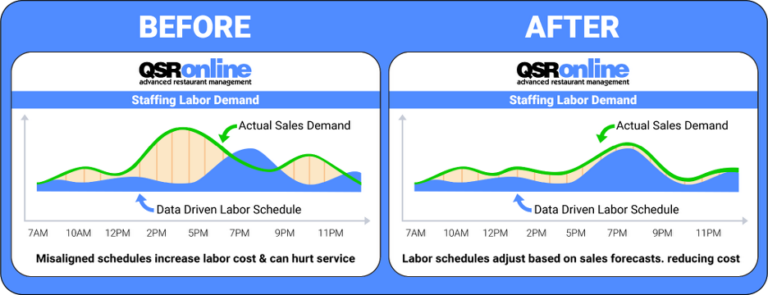
    Match Staffing Levels to Expected Business

    Once you know how much business to expect, determine the labor needed to support it.

    Scheduling too many employees during slower periods can unnecessarily increase labor costs. Scheduling too few during peak periods can leave employees overwhelmed and hurt speed of service and guest experience.

    The best way to schedule restaurant staff is to balance coverage with labor targets. The goal isn’t to use the fewest possible labor hours, it’s to schedule the appropriate amount of labor for the expected business.

    This is also where effective scheduling can help reduce restaurant labor costs without relying on across-the-board cuts to employee hours.

    Match Employee Availability and Skills to Each Shift

    Once staffing needs are established, managers can begin filling the schedule.

    Employee availability and time-off requests matter, but managers should also consider roles, experience, and skills.

    A busy Saturday night, for example, may require a different mix of employees than a slower weekday shift. Putting experienced employees in key positions during peak periods can help the restaurant handle higher volume more effectively.

    Effective restaurant staff scheduling isn’t just about how many employees are working. It’s also about who is working and where they’re needed.

    Publish Schedules Early and Communicate Changes Clearly

    A good schedule needs to work for employees, too.

    Set clear deadlines for availability and time-off requests, and publish schedules consistently and as far in advance as possible. Giving employees adequate notice makes it easier for them to plan around their shifts and can reduce avoidable scheduling conflicts.

    When changes do happen, communicate them clearly so managers and employees are working from the same information.

    Build Flexibility for Call-Outs and Shift Changes

    Even the best restaurant schedule will change.

    Employees get sick, shifts need to be traded, and business levels don’t always match the forecast. Build enough flexibility into the scheduling process to respond without completely disrupting the labor plan.

    Having a consistent process for handling restaurant employee call-outs and shift changes can make those last-minute situations easier to manage.

    Review Performance and Improve the Next Schedule

    Scheduling shouldn’t end once the week is over.

    Compare what you expected to happen with what actually happened. Look at forecasted demand versus actual sales and scheduled labor versus actual labor.

    Was a shift consistently overstaffed? Did a rush require more coverage than expected? Did employees regularly stay later than scheduled?

    Those answers can help managers improve the next forecast and build a better schedule the following week.

    Build Better Restaurant Schedules With Better Data

    The best restaurant schedules aren’t built from availability alone. They’re built by understanding expected demand, determining the labor required, and then matching the right employees to those needs.

    Restaurant scheduling software can make that process easier by bringing forecasting, labor planning, employee scheduling, and performance data together.

    QSROnline’s restaurant employee scheduling software helps restaurant managers build schedules around expected business while giving operators greater visibility into labor.

    Ready to take the guesswork out of restaurant scheduling? Explore QSROnline Labor to see how forecasting and scheduling can work together.


    No tags.

    Related Posts

    • What Is Restaurant Scheduling Software?

      By Taren Martin | Comments are Closed

      Restaurant scheduling software is a digital tool that helps restaurant managers create employee schedules, manage staffing needs, communicate schedules, and monitor planned labor. Instead of relying on paper schedules, spreadsheets, or disconnected systems, restaurants canRead more

    • How Do Restaurant Managers Handle Shift Changes and Call-Outs?

      By Taren Martin | Comments are Closed

      Shift changes and call-outs are unavoidable in restaurant operations. Employees get sick, emergencies happen, and availability changes, often just hours before a shift begins. Restaurant managers typically handle call-outs by identifying the staffing gap, findingRead more

    • Your POS Knows Sales. Your Inventory Knows Food Cost. So, What Knows Everything?

      By Taren Martin | Comments are Closed

      The answer: Your Restaurant Data Warehouse. Every restaurant system has a job to do. Your POS tracks sales. Your labor platform manages schedules. Your inventory system monitors food costs. Your accounting software handles financials. YourRead more

    • The Hidden Costs of Poor Restaurant Purchasing (And How to Stop Overpaying)

      By Taren Martin | Comments are Closed

      Negotiating better food prices is important, but it’s only half the battle. Many restaurant operators spend countless hours shopping vendors, comparing price sheets, and trying to squeeze another penny out of every case of chickenRead more

    • The Mid-Year Restaurant Checkup: 5 Metrics You Should Review Before Fall

      By Taren Martin | Comments are Closed

      Summer often brings packed dining rooms, busy kitchens, and strong sales. While it’s tempting to focus solely on getting through the rush, savvy restaurant operators know that mid-year is the perfect time to pause, assess,Read more

    Previous

    Recent Posts

    • 3 September, 2026
      Comments Off on Restaurant Staff Scheduling Best Practices: How to Build Better Employee Schedules

      Restaurant Staff Scheduling Best Practices: How to Build Better Employee Schedules

    • 27 August, 2026
      Comments Off on What Is Restaurant Scheduling Software?

      What Is Restaurant Scheduling Software?

    • 26 August, 2026
      Comments Off on How Do Restaurant Managers Handle Shift Changes and Call-Outs?

      How Do Restaurant Managers Handle Shift Changes and Call-Outs?

    • 25 July, 2026
      Comments Off on Your POS Knows Sales. Your Inventory Knows Food Cost. So, What Knows Everything?

      Your POS Knows Sales. Your Inventory Knows Food Cost. So, What Knows Everything?

    Ready to See QSROnline in Action?

    Ready to See QSROnline in Action?

    Get a personalised demo and see how we can help your business save time, control costs, and grow profits.

    Reduce Food Cost

    Improve Labor Efficiency

    Real-Time Reporting

    Increase Profitablity

    Reduce Food Cost

    Improve Labor Efficiency

    Real-Time Reporting

    Increase Profitablity

    Request Your Free Demo
    Or Contact Sales

    Prefer to Learn More First?

    Prefer to Learn More First?

    Download Buyer's Guide

    A complete guide to choosing the right restaurant management software.

    Download Now

    View Case Studies

    See how restaurant like your are achieving real results.

    View Now

    Watch Product Video

    See QSROnline in action in just 2 minutes.

    Watch Now

    Contact Sales

    Have Questions? Our team is here to help.

    (800) 971-1650

    ADDRESS

    5633 S. Staples St. Suite 100

    Corpus Christi, TX 78411

    Sales:

    (800) 971-1650

    sales@qsronline.com

    Support:

    (877) 334-6640

    support@qsronline.com

    SERVICES

    • LABOR SCHEDULING & MANAGEMENT
    • INVENTORY AND FOOD COST MANAGEMENT
    • ENTERPRISE REPORTING
    • ACCOUNTING & PAYROLL AUTOMATION
    • MOBILE APP SUITE

    COMPANY

    • ABOUT US
    • CUSTOMERS
    • INTEGRATIONS
    • CAREERS
    • CONTACT US
    Copyright ©2026 QSROnline.com, LLC.
    • About Us
      • Customers
      • Our Story
      • Meet The Team
      • Careers
    • Solutions
      • Labor Scheduling & Management
      • Inventory & Food Cost Management
      • Enterprise Reporting
      • Accounting & Payroll Automation
      • Mobile App Suite
        • Labor Scheduling App
        • Counting App
        • Reporting App
    • Resources
      • Blog
      • Case Studies
      • Overview Videos & Testimonials
    • Affiliate Program
    • Integration Partners
    • Pricing
    • Contact Us
    • REQUEST A DEMO
    QSROnline – Restaurant Management Software
    Manage Consent
    To provide the best experiences, we use technologies like cookies to store and/or access device information. Consenting to these technologies will allow us to process data such as browsing behavior or unique IDs on this site. Not consenting or withdrawing consent, may adversely affect certain features and functions.
    Functional Always active
    The technical storage or access is strictly necessary for the legitimate purpose of enabling the use of a specific service explicitly requested by the subscriber or user, or for the sole purpose of carrying out the transmission of a communication over an electronic communications network.
    Preferences
    The technical storage or access is necessary for the legitimate purpose of storing preferences that are not requested by the subscriber or user.
    Statistics
    The technical storage or access that is used exclusively for statistical purposes. The technical storage or access that is used exclusively for anonymous statistical purposes. Without a subpoena, voluntary compliance on the part of your Internet Service Provider, or additional records from a third party, information stored or retrieved for this purpose alone cannot usually be used to identify you.
    Marketing
    The technical storage or access is required to create user profiles to send advertising, or to track the user on a website or across several websites for similar marketing purposes.
    • Manage options
    • Manage services
    • Manage {vendor_count} vendors
    • Read more about these purposes
    View preferences
    • {title}
    • {title}
    • {title}